A website audit is a structured check of your site against what search engines and visitors need: pages Google can find and index, clear titles and descriptions, sensible headings, a usable mobile experience, working links, basic security and structured data. A good audit shows what is already working, which problems are real and the order to fix them in.
Most websites have a few things quietly holding them back on Google, but very few have the disaster a page of red warnings suggests. The hard part isn't running a check; it's knowing which warnings matter and which can wait.
This guide covers what a good audit checks, how to read the results calmly, what to fix first and how often to check again. If you'd like your own results while you read, our free website audit comes with the 7-day £1 trial and checks the essentials on your homepage.
What is a website audit?
It's a health check. Software, a person or both look at your pages the way Google does and report what passes, what needs attention and why each point matters.
A homepage audit checks your most important page in detail. A full site audit crawls every page it can reach, finding things like duplicate titles or broken links in old blog posts. Specialist checks go deeper on one area, such as security or AI search.
Search is still where most customers start: Ofcom's Online Nation 2025 report found that Google Search is used by 82% of UK adults. If something stops Google reading your site properly, fixing it matters more than almost any amount of new content.
What a good website audit checks
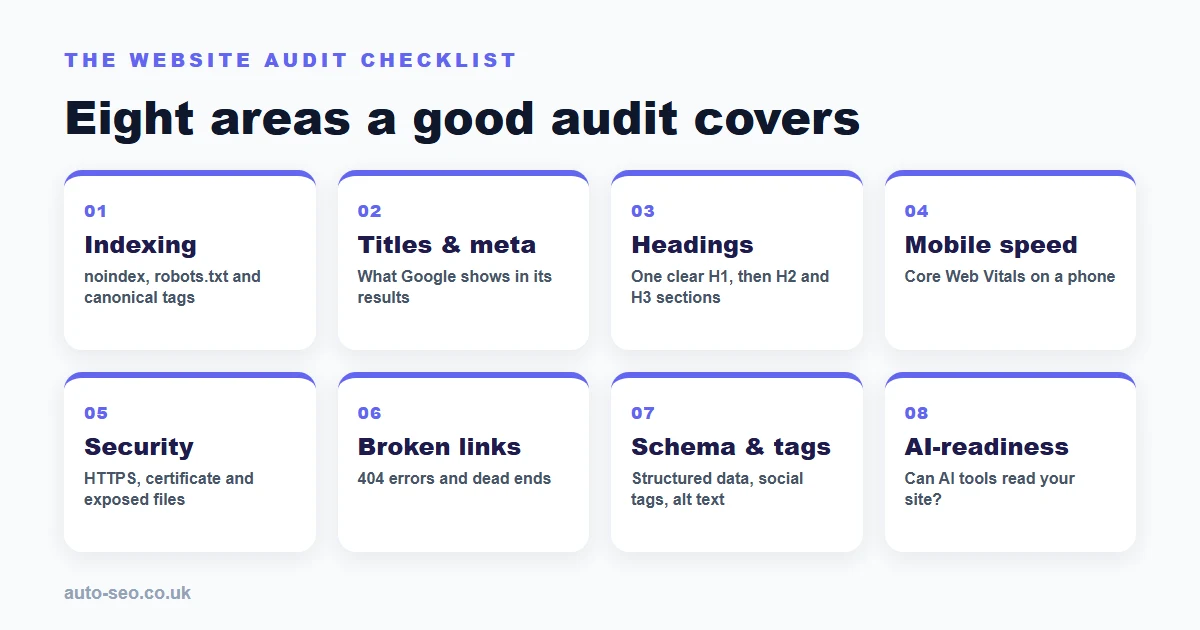
Whichever tool or provider you use, a useful audit should cover these eight areas, roughly in the order Google meets them.
1. Indexability: can Google see the page?
This is the most important check. A "noindex" tag left over from when the site was built tells Google not to list a page. One line in robots.txt can block crawlers from the whole site. A canonical tag tells Google which version of a page is the main one. Problems here can keep pages out of search results entirely, so they go first on any fix list.
2. Page titles and meta descriptions
The title tag is the headline Google shows in its results, and the meta description is usually the summary underneath. Look for titles that are missing, repeated across pages or too vague; a homepage called simply "Home" is common. Missing descriptions are worth writing, although Google sometimes builds its own from text on the page.
3. Headings and content structure
Each page needs one clear main heading (the H1) saying what it is about, then subheadings (H2, H3) that break it into sections. The audit should also check there is enough readable text: a homepage made mostly of images gives Google little to go on.
4. Speed and the mobile experience
Google's Search Central documentation says it uses the mobile version of a site's content for indexing and ranking, so your site on a phone is the one that counts. Google's Core Web Vitals give the benchmarks: main content visible within 2.5 seconds (Largest Contentful Paint), a response to a tap within 200 milliseconds (Interaction to Next Paint) and a Cumulative Layout Shift of 0.1 or less, so the layout stays steady.
5. Security basics
At a minimum, the site should load over HTTPS with a valid certificate that isn't close to expiring, and the plain http address should redirect to the secure one. A fuller security check also looks at security headers, files that shouldn't be public (such as old backups) and out-of-date WordPress software.
6. Broken links
Links that lead to a 404 "page not found" error frustrate visitors and waste the attention search engines give your site. Internal links matter most because you control them. A careful audit only calls a link broken when it gets a definite error, not when a server is slow to answer.
7. Schema, social tags and alt text
Schema is hidden code that gives search engines facts about your business, such as your address, opening hours or FAQs; the audit should say which types it found, such as LocalBusiness or Organization. Open Graph tags control the title and image shown when someone shares your page on Facebook, LinkedIn or WhatsApp, and alt text describes images for screen readers and search engines. All three are quick wins.
8. AI-readiness
ChatGPT, Gemini and Perplexity now answer many questions that used to start with a Google search. An AI-readiness check looks at whether AI crawlers can reach your site, whether your content sits in clean HTML and whether you have structured data and a clear page summary. Newer extras such as an llms.txt file are a bonus, not a failure. Our AI Readiness Check scores 12 of these signals out of 100, and our guide to generative engine optimisation explains how AI tools choose which businesses to mention.
How to read your audit results without panicking
Some tools show dozens of red crosses for things that barely matter. These principles keep results in proportion:
Start with what's working. If your titles, headings and HTTPS are sound, you already have a solid base.
Separate "can't be found" from "could be better". A noindex tag is urgent. A meta description a few words short is not.
Treat "couldn't check" as unknown, not broken. If a tool was blocked by your firewall or timed out, that isn't evidence of a fault. Run it again or check by hand.
Look for patterns. One image without alt text is a two-minute job. Every product page sharing one title points to a template problem worth fixing once.
Don't judge by the score alone. A score out of 100 helps you track progress, but tools weight things differently. The specific findings matter more.
What to fix first
Work through the findings in order of impact. This order suits most websites:
Priority | What to fix | Why it comes here |
|---|---|---|
1 | Indexing blocks (noindex, robots.txt, wrong canonical) | If Google can't list the page, nothing else matters yet |
2 | Security (HTTPS, expired certificate, exposed files) | Browsers warn visitors away from sites that aren't secure |
3 | Broken internal links and server errors | Dead ends lose visitors and waste crawling |
4 | Titles, meta descriptions and the H1 | They shape how you appear in results and whether people click |
5 | Mobile speed and layout | Google judges your site on its mobile version |
6 | Schema, social tags and alt text | Quick wins that make your listing clearer |
7 | AI-readiness extras | Worth doing once the basics are sound |
Some fixes are simple, such as editing a page title or, in WordPress, unticking "Discourage search engines from indexing this site" under Settings, then Reading. Speed and schema work can need a developer, so ask for a fixed price per fix before any work starts. Our guide to troubleshooting common SEO problems covers other issues that hold sites back.
How often should you run a website audit?
There's no fixed rule, but this rhythm suits most UK businesses:
Before you start. Check before you publish new content or pay for SEO, so you aren't building on a hidden problem.
After any big change. A redesign, new platform, new theme or domain change is when noindex tags and broken links most often appear.
Every three months. A quarterly check catches certificates near expiry, plugin updates that changed something and links that broke when pages were removed.
When traffic drops unexpectedly. It helps you rule technical faults in or out before changing anything else.
Keep each report so you can compare checks. Regular publishing then builds on a clean base; our guide to what automated SEO is explains how that weekly work fits around occasional audits.
How the Auto-SEO website audit works
Auto-SEO is an automated SEO platform for UK businesses. Every new trial includes an audit, because we don't want to write great content for a site that still has technical problems holding it back.
Start your trial. The free audit is included with the 7-day £1 trial.
We check your homepage. That covers your title and meta description, headings, readable text, schema, canonical tag, social sharing tags, image alt text, page weight, mobile set-up, HTTPS and certificate, any noindex or robots.txt block, and a sample of your homepage links.
You get a plain-English report. It opens with what is already working well, then lists quick wins in priority order, each with a fixed price if you'd like our team to make the fix.
View it any time. The report link arrives by email, and every client dashboard now has a My website audit link, so you can open your audit whenever you need it.
For a deeper look, our full technical audit (£49 one-off) covers your whole site, including Core Web Vitals, sitemap and robots.txt, broken links and keyword gaps. From your dashboard you can also run the £19.99 Website Security Check, which scores your site out of 100 and includes one free re-check within 7 days.
No audit can guarantee rankings, and nobody can honestly promise you a position on Google. An audit removes the technical reasons a good website might be overlooked. After the trial, plans start at £49 a month for weekly articles, backlinks and rank tracking, with no contracts; our pricing page has the full breakdown.
Frequently Asked Questions
What is a website audit?
A check of your site against what search engines and visitors need, from indexable pages and clear titles to mobile speed, working links, security and structured data. The report shows what works and what to fix first.
Is a free website audit worth doing?
Yes, as a starting point. A free homepage audit catches the problems that matter most, such as indexing blocks, missing titles or an expired certificate. A paid full-site audit goes further, checking every page for duplicate titles, broken links and speed issues.
What is the difference between an SEO audit and a website audit?
The terms are often used interchangeably. An SEO audit focuses on what affects search visibility, while a broader audit can also cover security, accessibility and ease of use. Most good reports cover both.
Can an audit guarantee better rankings?
No. It finds technical issues that can hold a site back, and fixing them gives your pages a fair chance. Rankings also depend on your content, your competitors and the links pointing to your site, so be wary of anyone who promises a position on Google.
Can I see my Auto-SEO audit again later?
Yes. Every client dashboard has a My website audit link that opens your audit report whenever you need it.
Ready to see where your own site stands? Start your £1 trial with a free website audit and the Auto-SEO team will show you what's working, what to fix first and how to put it right.