On-page SEO is the work you do on the page itself so Google can tell what it covers, who it helps and whether to trust it. Google doesn't give your page a score you can see, but it does read a clear set of signals, and many websites miss the simplest ones.
We can put a number on that. In one industry study of about 11,000 pages, 59.5% were missing their exact target keyword from the page title, and 63.3% were missing it from the H1, the main headline. These pages belonged to people already using an SEO tool, so the gap is common even among those who are trying.
The good news is that most of this sits within your control. Here's what matters, what's proven and what to fix first.
Key takeaways
Start with four places. Put your main phrase in the page title, H1 and opening paragraph, and keep your URL short and readable.
Cover the topic properly. Use the related terms a customer would expect, without repeating yourself.
Make the page easy to scan. Clear headings, lists and tables help readers and search engines.
Link your own pages together. Supporting articles should point up to the service page you most want to rank.
Stay realistic. Trust, links and authority still count, and no single tweak guarantees a ranking.
How Google really scores your page
Google has never published a scorecard, so any number you see comes from a tool, not from Google. What Google does explain, in its How Search Works pages, comes down to three questions.
Is this page about the search? Google says that when keywords appear in a page's headings or body text, the information "might be more relevant".
Does it cover the topic properly? Its systems look for other relevant content beyond the keyword itself.
Can it be trusted? One quality factor is whether other prominent websites link to or refer to the content.
On-page SEO answers the first two questions directly and helps with the third. If you're not sure where your site stands today, a full website SEO audit shows you what's stopping it ranking.
The on-page SEO signals at a glance
Signal | Its job | How strong is the evidence? |
|---|---|---|
Page title | Names the topic and wins the click | Strong: Google uses it for search listings |
H1 and headings | Show what each section covers | Strong: Google names headings directly |
Opening paragraph | Confirms the topic straight away | Good: keywords in body text count |
Related terms | Prove you've covered the subject | Strong: Google describes this |
URL | Helps people read the address | Weak: Google says "hardly any effect" |
Internal links | Help Google find and understand pages | Strong: Google uses links as a signal |
Schema | Explains the page in code | Indirect: it can change how you appear |
Word count | Gives you room to cover the topic | Indirect: Google says length alone doesn't count |
Put your main phrase in the four places that count
Start here, because it's the quickest fix on most websites.
Page title
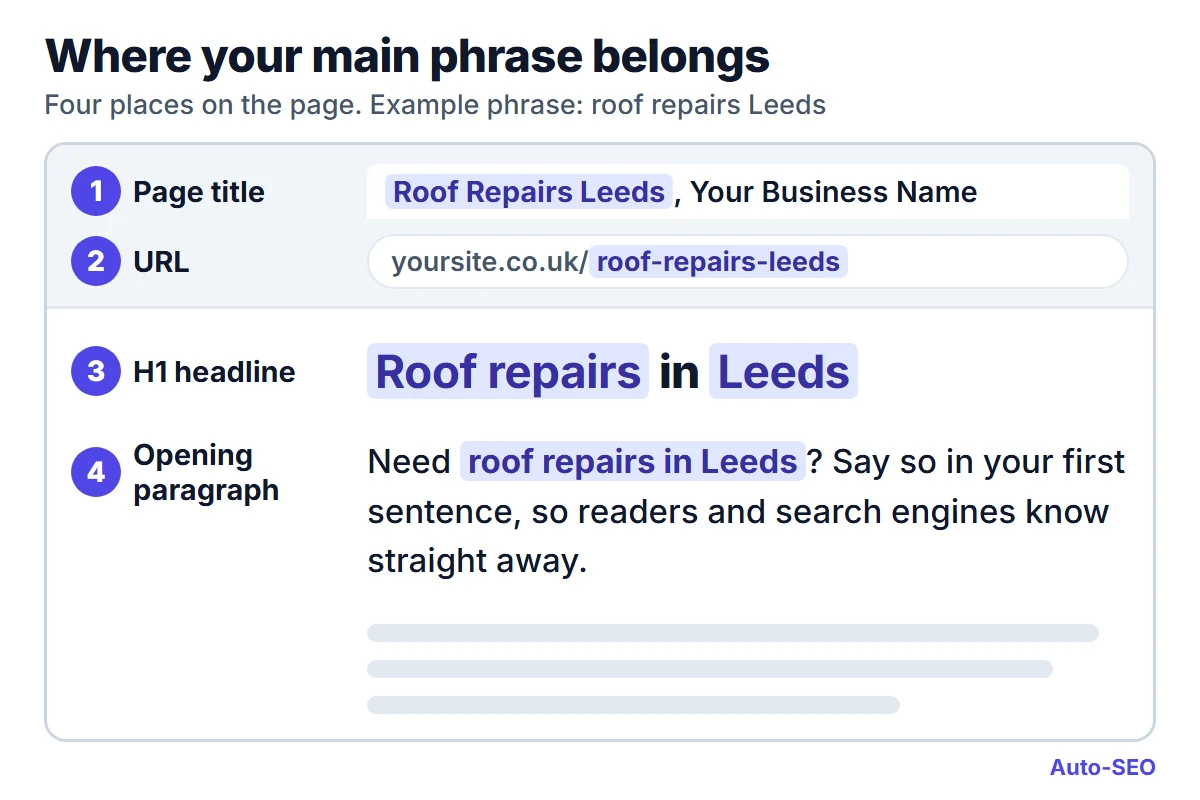
The title is the text in your browser tab, and Google often uses it as the headline in search results. Lead with what you do and where you do it, then add your business name. Google says a good title is unique to the page, clear and concise.
H1 headline
The H1 is the big headline people see first. Business websites often use it for a slogan, which tells Google nothing about the service. Keep the clever line for your strapline and use the H1 to say what the page offers.
Opening paragraph
Use your main phrase in the first sentence or two, and answer the question straight away. This helps a reader who's deciding whether to stay, and it confirms the topic for Google.
URL
Keep it short and readable. To be fair to the evidence, Google says keywords in a URL have "hardly any effect" beyond how the address displays, so this one is more for people than rankings. If a page already ranks, leave its URL alone unless you have a strong reason to change it, and always redirect the old address if you do.
Here's how that looks for a made-up roofer in Leeds.
Place | Weak | Clear |
|---|---|---|
Page title | Home, Your Business Name | Roof Repairs Leeds, Your Business Name |
H1 | Quality you can trust | Roof repairs in Leeds |
Opening line | We pride ourselves on great service | We carry out roof repairs across Leeds, from slipped tiles to storm damage |
URL | /services/page-12 | /roof-repairs-leeds |
Your meta description, the short summary under your title in search results, is worth writing too. Google doesn't always show it, but a good one gives people a reason to choose you. The old keywords meta tag can go, as Google doesn't use it.
Use the related terms your customers expect
Google's own example is a search for dogs. You probably don't want a page that says "dogs" hundreds of times, so its systems look for other relevant content, such as pictures, videos or a list of breeds.
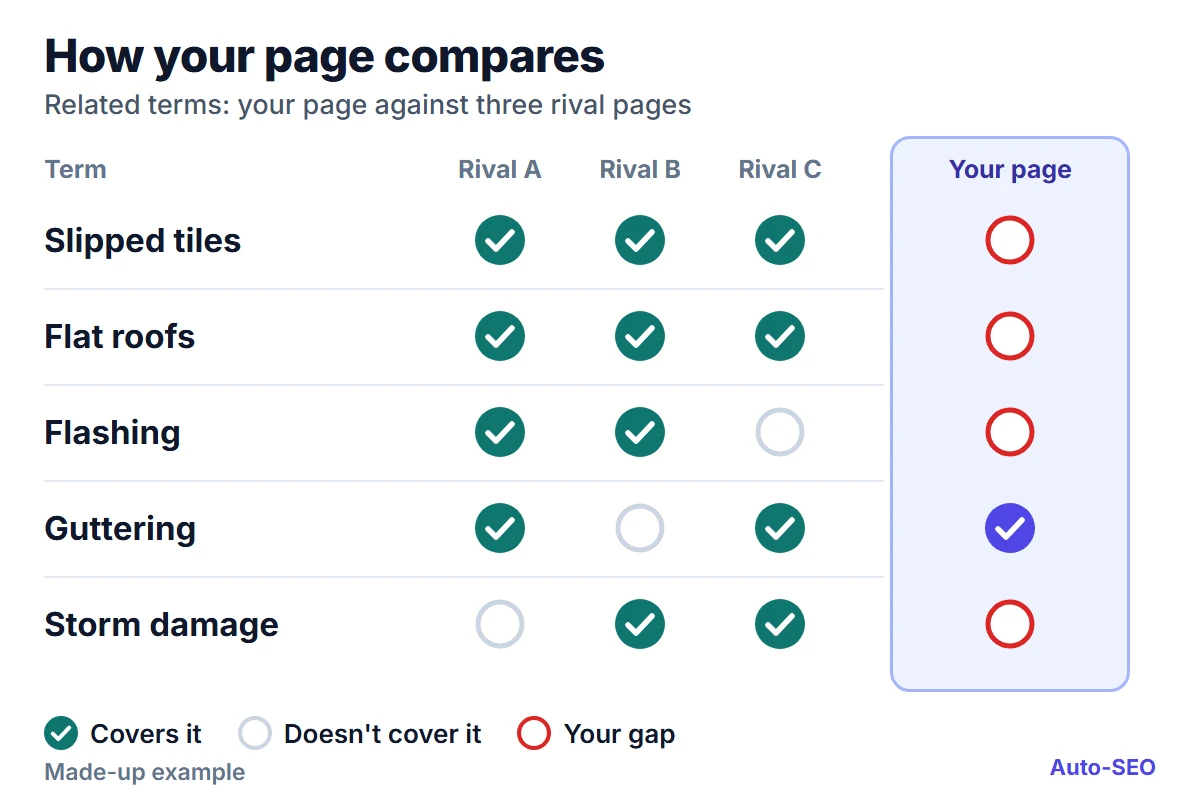
The same goes for your services. A page about roof repairs that never mentions slipped tiles, flashing or guttering looks thin, even if it says "roof repairs" a dozen times. In the same study, 99.4% of pages had at least one related term missing, and the average page was missing about 20.
To find your gaps, search for your main phrase and read the top three or four results. Note the topics they all cover, then ask whether yours does. The questions customers ask you on the phone are often the best source of all.
Term (made-up example) | Rival A | Rival B | Rival C | Your page |
|---|---|---|---|---|
Slipped tiles | Yes | Yes | Yes | No |
Flat roofs | Yes | Yes | Yes | No |
Flashing | Yes | Yes | No | No |
Guttering | Yes | No | Yes | Yes |
Storm damage | No | Yes | Yes | No |
If most rivals cover a term and you don't, that's your next paragraph. Never write it just to fill a gap, though: study your competitors' structure, then say it in your own words with your own experience. Our guide to writing content for local searches shows how to keep this useful for customers in your area.
There's no safe number of times to repeat a phrase. Google says keyword stuffing is against its spam policies, so if a sentence sounds odd read aloud, rewrite it.
Give every page a clear structure with headings
Good headings let a visitor find their answer in seconds. Use one H1, an H2 for each main topic and an H3 for points inside that topic, and make each heading say something real.
Google has said the order of your headings doesn't matter for Search, so don't panic over a stray H3. Tidy order still helps people using screen readers, and clear headings are one of the places Google says it looks for keywords. Writing headings as your customers' questions usually works well.
How long should a page be?
Long enough to answer the search properly, and no longer. Google says the length of content alone doesn't matter for ranking, and there's no ideal word count.
Length still shows up in the data. In that study, pages averaged 1,534 words against a target of 2,194 taken from rival pages, and 58.5% fell more than 20% short. It also found about a quarter ran more than 20% over, so overshooting is common as well.
So let the search decide. If the top results are short, practical pages, match that. If they're full guides, a 300-word page probably can't cover what the reader needs.
Lists, tables and images earn their place
The study found 66.2% of pages were missing structural elements such as the lists, images and internal links that rival pages used. Long blocks of text are harder to read on a phone, and that's where many of your customers are.
Use numbered lists for steps, such as how a job works from first call to finish.
Use bullet lists for options, such as the areas you cover.
Use tables for comparisons, such as repair against replacement.
Describe your images. Alt text is a short description that tells Google how a picture relates to the page.
This helps with AI search as well, because a clear answer is easier to lift than one buried in a long paragraph. Google says there are no special extra steps for appearing in AI Overviews or AI Mode, so good structure and plain text are the job. We explain more in our piece on getting recommended by AI search.
Build a reverse silo with your internal links
A reverse silo is a simple way to link your pages so that supporting articles lift the page you most want to rank. The idea is widely taught in SEO, and it's easy to copy on any website.
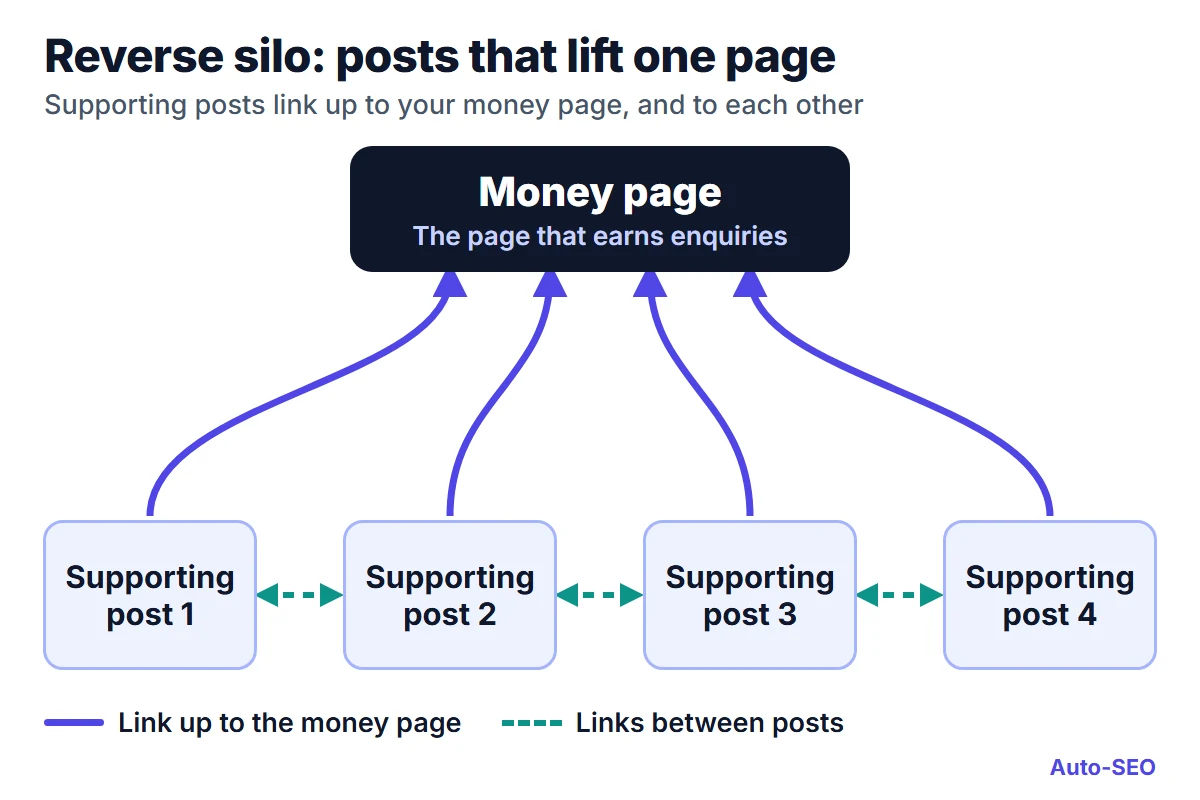
Pick your money page. This is the service page that brings in enquiries, such as roof repairs in Leeds.
Write three to five supporting articles. Each one answers a real question, such as how to spot a slipped tile.
Link every article up to the money page. Put the link in the body text, with words that describe the service.
Link the articles to each other. This keeps readers moving and keeps the group tied together.
Google backs the basics here. It says links are a signal for relevance and for finding new pages, and that every page you care about should have a link from at least one other page on your site. It also says good link text is descriptive and concise, so skip "click here".
Don't chain links close together either. Google lists that as a bad example, because readers struggle to tell them apart.
Schema and trust protect what you've built
Schema is code that tells search engines what a page represents, such as a business, an article or a list of questions. In the study, 45% of pages had no schema detected at all.
Google calls it "explicit clues" about a page's meaning, but the study's authors themselves say it isn't a direct ranking factor. Add it because it helps Google understand you and can improve how you appear, and make sure it matches what's visible on the page.
Trust works in a similar way. Google says E-E-A-T, which stands for experience, expertise, authoritativeness and trust, isn't a specific ranking factor, but it also says trust is the most important part. The study found 79.8% of pages were missing at least one trust or identity type of schema.
For a UK business, the basics are simple and worth doing today.
Show who you are. Add a real about page, a named person where you can, and easy contact details.
Show your proof. Include genuine reviews and any registrations that apply, such as Gas Safe, NICEIC, the SRA or the FCA.
Meet the legal basics. Limited companies must show their registered number and registered office on their website, according to GOV.UK.
Keep your details matching. Your name, address and phone should agree everywhere, as our local search ranking factors guide explains.
On-page vs off-page SEO: links and authority still matter
On-page SEO won't do the whole job, and anyone who says otherwise is overselling it. On-page work helps Google understand your page. Off-page work, mainly links and mentions from other websites, helps show that others rate it.
Google says PageRank is still part of its core ranking systems, and that links from prominent websites are one way it judges quality. A well-built page on a new website can still lose to a weaker page on a site with years of trust behind it.
Think of the two as partners. Good pages give people something worth linking to, and those links help your best pages reach further, which is why backlinks still matter for UK websites.
What's still unproven
You'll see some confident numbers repeated online. We looked for the evidence behind three of them.
"Three internal links equal one backlink." We couldn't find a published test behind this ratio. Internal links clearly help, but we wouldn't treat them as a straight swap.
"Four placements make up 60% of on-page strength." Placement matters, as Google's own wording suggests, but we found no public data for this percentage.
"You need a score of 80 out of 100." That's a software measure, not a Google one. The study page shows how pages scored, but it publishes no data linking those scores to rankings.
Your on-page SEO checklist
Take one important page and work through these in order. For a wider look at your site, try our website audit checklist.
Does the page title name your service and area?
Does the H1 say what the page offers?
Does the first sentence or two use your main phrase and answer the question?
Is the URL short and readable?
Does the page cover what the top results cover?
Do your headings make sense when read on their own?
Could a list or table make any section clearer?
Do your images have useful alt text?
Do at least three related pages link to it?
Does it show who you are and how to contact you?
FAQs: on-page SEO
What is on-page SEO in simple terms?
It's everything on your page that helps Google understand it, including your title, headings, wording, images and internal links. Off-page SEO covers what happens elsewhere, mainly links and mentions from other websites.
Does Google give my page a score?
Not one you can see. Google uses many systems to rank pages and doesn't publish a score. The scores you see in SEO tools are each tool's own estimate.
Is on-page SEO more important than backlinks?
You need both. On-page SEO is usually the better place to start because you control it and it costs little, while backlinks help you compete on harder searches.
How long does on-page SEO take to work?
Google says some changes can take effect in a few hours and others could take several months. It suggests waiting a few weeks before you judge whether a change has helped.
Do I need special on-page SEO for AI search?
No. Google says there are no extra requirements for AI Overviews or AI Mode, and no special schema to add. Clear, helpful text is the place to start.
Where these figures come from
The study comes from PageOptimizer Pro, which sells on-page SEO software. It covers 10,937 pages from its own users, taken from reports run between 10 and 30 April 2026, before those pages were optimised. Read it as one useful snapshot of the gaps pages have, not as proof of what ranks.
Google's statements come from its How Search Works pages and its Google Search Central documentation, including the SEO Starter Guide, read in November 2026.
See how your website reads today
The quickest next step is to look at your own site. Scan your website and our AI will read it, work out what you do and find your best search terms.
If you like what you see, you can start your trial and let us do the regular work for you, with articles written and published to your website every week. We'd be glad to help your pages get found.
No card needed. Then try it for 7 days for just £1, including a FREE website audit worth £49.